In digital marketing, how fast you collect leads changes both the cost and how quickly a sale closes. Instead of sending people to a long website, many businesses create a Zalo Form so the customer enters a name, a phone number, and what they need without leaving Zalo — Vietnam’s most used messaging app. That shortens the path to a conversion.
Because the form collects data inside Zalo, a Zalo Form ad lets the business take the customer’s name, phone number, and what they want advice on as soon as they interact with the ad.
So what is a Zalo Form? How do you build one that works? This is an A to Z guide to creating a Zalo Form for someone doing it the first time: the accounts you need, 10 steps in Zalo Ads, the parts of the form, common mistakes, and an FAQ — plus a link to 5 steps to run Zalo Form ads that bring in leads once the form is ready.
What is a Zalo Form?
What is a Zalo Form? That is the question many businesses ask when they start running lead ads on Zalo.
A Zalo Form is a form that collects customer details inside Zalo Ads. When someone sees the ad, they can tap the call to action and fill in the form without leaving Zalo.
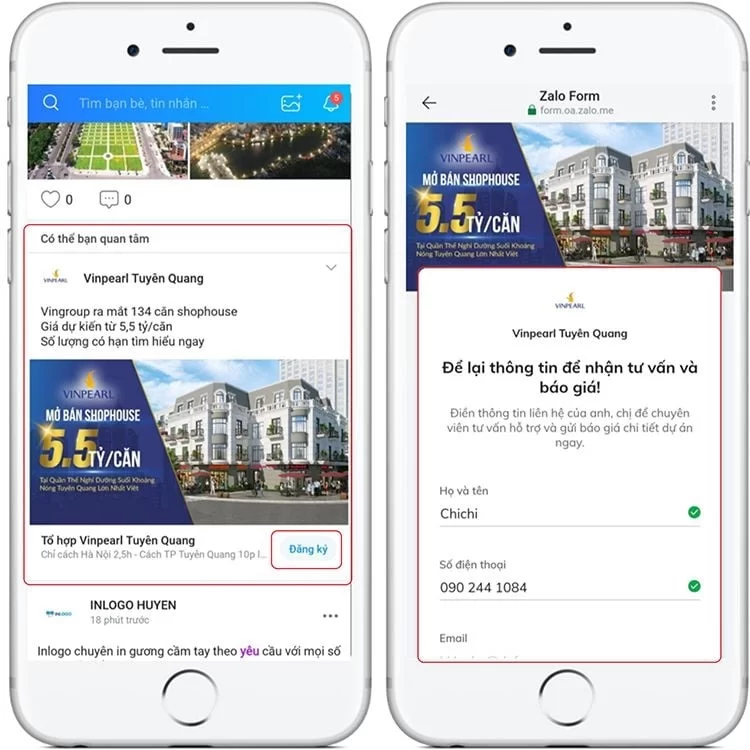
With a Zalo Form, a business can collect:
- The customer’s name
- Phone number
- What they want to buy, or which service they need
- Other survey questions
For example, a real estate business runs a Zalo Form ad that says “Get the latest apartment price list”. Someone who is interested only has to enter their details to be contacted.
What to prepare before you create a Zalo Form
Before you create a Zalo Form ad, a few things need to be in place.
A Zalo Ads account
First you need a Zalo Ads account so you can create and manage campaigns.
From that account the business can:
- Create an ad campaign
- Set a budget
- Track results
- Manage customer data
A Zalo Official Account (OA)
A Zalo OA is the business profile on Zalo. It is how the brand shows up there.
An OA with complete information makes the form and the ads look more professional.
The form copy
Before you build the form, prepare:
- The form title
- The introductory copy
- A cover image
- The questions you will ask
The clearer that copy is, the easier it is for someone to decide to sign up.
10 steps to create a Zalo Form
Step 1: Open Zalo Ads
Sign in to Zalo Ads.
Then choose:
Create ad → View all ad types → Form ad
That is the first step in creating a Zalo Form.
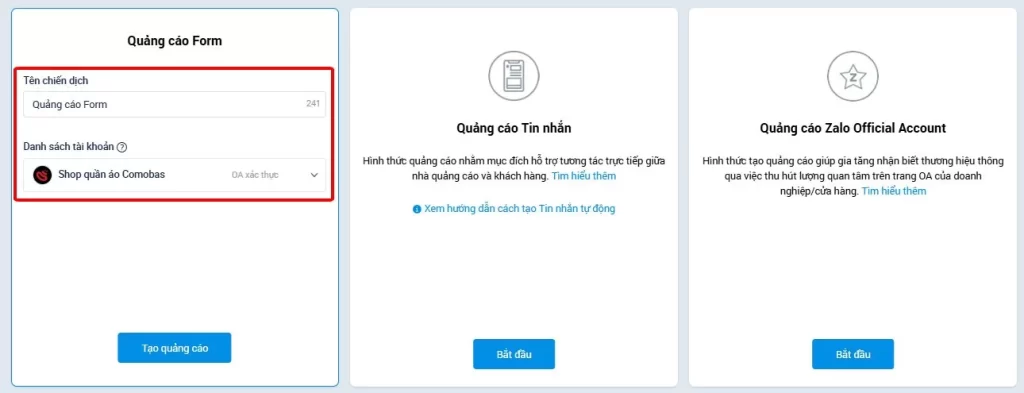
Step 2: Create the form ad campaign
After you select the form ad, create a new campaign.

You need to set:
- Campaign name
- Ad account
- Official Account
Name the campaign so you can still tell them apart later.
Examples:
- Lead form, premium apartments
- Lead form, July
- Customer consultation campaign
A clear name makes it easier to read results after you create the Zalo Form.
Step 3: Name the campaign and choose an Official Account or an ad profile
The advertiser names the campaign so it is easy to recognise and to tell apart from other ads. Then they choose the Official Account or the ad profile that will run the ad.
Step 4: Choose the audience
One thing that decides whether creating a Zalo Form pays off is targeting people who might actually want the offer.
You can set:
Location
Examples:
- Ho Chi Minh City
- Hanoi
- Binh Duong
Age
Example:
- 25–45
Interests and behaviour
Examples:
- Interested in real estate
- Shops online
- Business owner
The right audience puts the Zalo Form ad in front of people who have a reason to respond.
Step 5: Set the ad budget
The business chooses:
- Total budget
- Daily budget
- Target cost
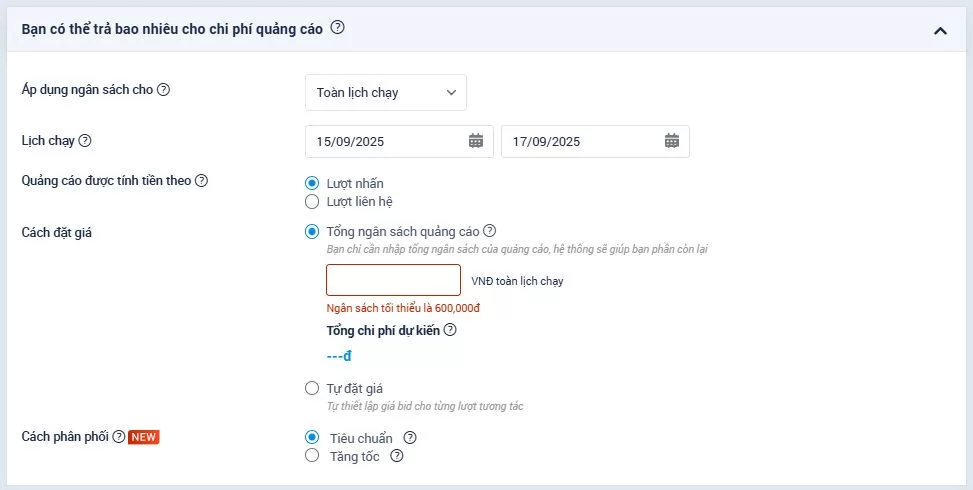
Example:
Budget:
VND 500,000/day
Target:
50 leads a month
The right budget lets your Zalo Form campaign deliver results without wasting ad spend.
Step 6: Build the lead form
At this step, choose:
Create a new form
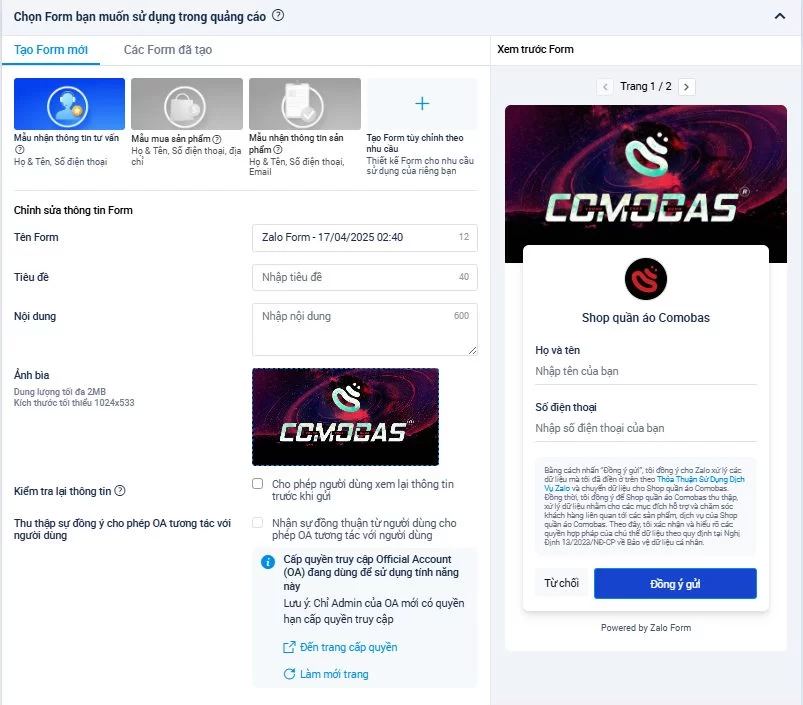
Then fill in:
Form name
Example:
“Get a quote for a premium apartment”
Form title
Lead with what the customer gets.
Not this:
“Fill in your details”
This:
“Get the latest price list and offers”
Description
Example:
“Leave your details and a consultant will send the full price list within 5 minutes.”
Form image
Use:
- A product photo
- An offer image
- An image that builds trust
Step 7: Add the questions
When people create a Zalo Form, a common mistake is adding too many questions.
A tighter form usually has:
- Full name
- Phone number
- 1 to 3 questions that actually matter
Real estate example:
- Which project are you interested in?
- What budget do you have in mind?
- When do you want to buy or rent?
The longer the form, the more people leave it.
Step 8: Write the ad
A Zalo Form ad that works needs:
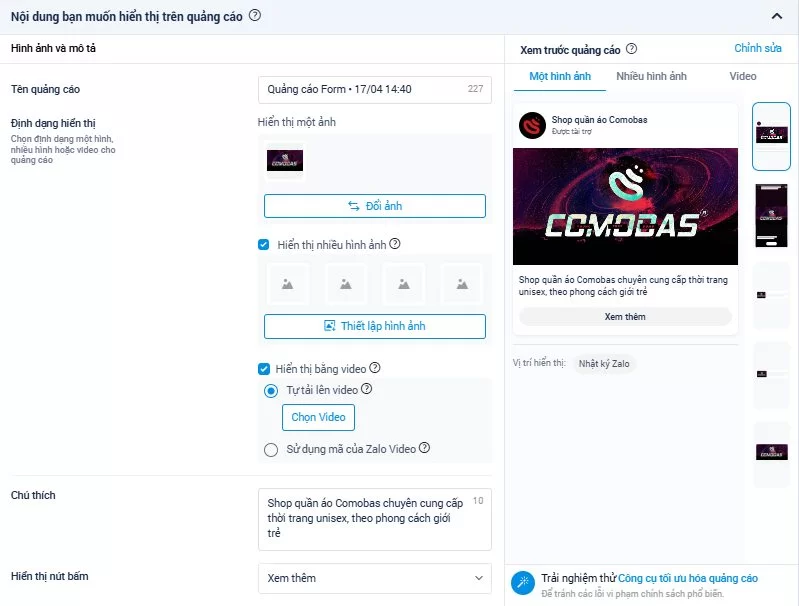
An image or video that stops the scroll
The creative has to earn attention in the first few seconds.
The ad copy
A useful order:
Hook → benefit → call to action
Example:
“Looking for a river-view apartment in Ho Chi Minh City? Get today’s latest price list.”
Call to action:
“Request a consultation”
Step 9: Add any required licence
Upload a licence for products or services that the Zalo Ads review team requires one for.

Step 10: Submit the ad for review
After you finish creating the Zalo Form, check:
- The ad copy
- The images
- The form itself
- The audience
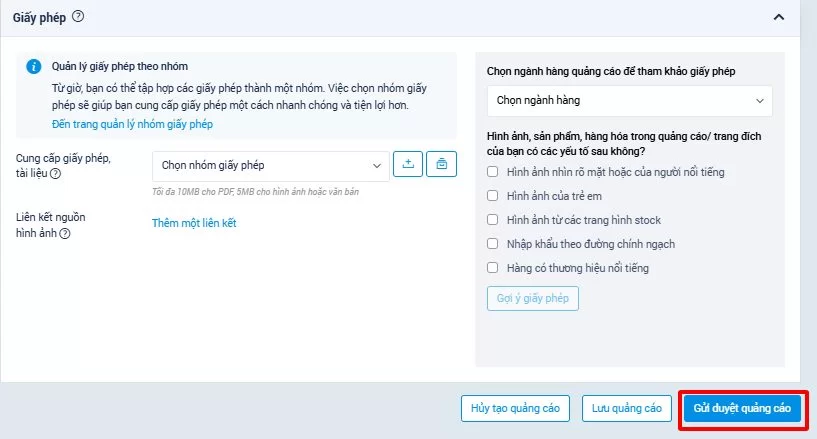
Then submit it so the ad can start delivering.
Creating the form is only the start of collecting customers. To get more from the campaign, the business still has to tune the copy, the audience, and the budget. See 5 steps to run Zalo Form ads that bring in leads.
The parts of a Zalo Form, and what to watch when you set them
Once the campaign exists, the form itself decides the quality of the leads you receive. A well set up Zalo Form is not the one that asks for everything. It is the one that feels short and clear enough that people finish it.
What do you fill in when you create a Zalo Form, and what is worth a second look? The sections below go through each part.
Form name
The form name is the label you use to manage forms, and it tells the person filling it in what the form is for.
A useful name is:
- Short, and easy to recognise
- Clear about what you are collecting
- Tied to the product or the campaign
Example:
Not this: Customer form 01
This: Premium apartment quotes, July
A clear name makes a stack of campaigns easier to manage.
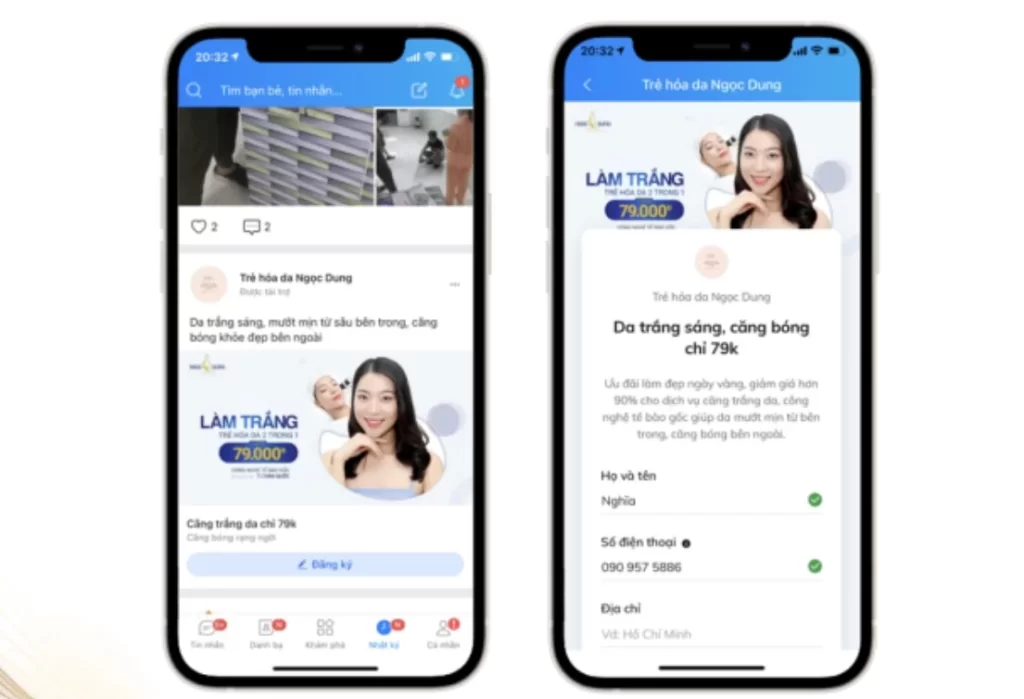
Form title and body copy
This is the introduction. It tells people what they get if they leave their details.
The title should state the benefit, not only ask them to register.
Example:
Not this: “Fill in your details for a consultation”
This: “Get the latest price list and a free consultation today”
The body can add:
- What they get by signing up
- How soon you will reply
- What the business commits to do
Clear, appealing copy raises the share of people who finish the form.
Cover image
The cover is the first thing people see when the form opens. A relevant image makes the form easier to trust and easier to use.
Zalo Form can pull the image automatically from:
- The Official Account (OA)
- The ad profile
You can also upload a cover of your own for a specific campaign.
When you choose one:
- Keep it sharp and professional
- Show the actual product or service
- Do not cover it in so much text that it is hard to read
Suggested size: 1024 × 533 px, no larger than 2MB.
Questions that collect customer details
This is the part of the Zalo Form that brings in the data you actually need from a lead.
The basic fields are usually:
- Full name
- Phone number
You can add custom questions to learn more about what the customer wants.
Examples:
Real estate:
- Are you looking to buy or to rent?
- What budget do you have in mind?
- When do you expect to go ahead?
Services:
- Which product do you want advice on?
- What do you need right now?
Do not add questions you will not use. Extra questions cost the customer time and fewer people submit.
Things to watch when you create a Zalo Form
To create a Zalo Form that holds up in a real campaign, keep these limits in mind:
- A Zalo Form allows up to 20 custom questions.
- Full name and phone number are default fields. You cannot delete them.
- You can reorder custom questions, or delete them.
- Keep only the fields you will use, so the form stays short.
An effective Zalo Form is not the form that collects the most fields. It is the form that brings in people who actually want the offer.
Get those parts right and the leads are more useful, the ad spend goes further, and the Zalo Form campaign performs better.
Mistakes people make the first time they create a Zalo Form
Creating a Zalo Form can bring in leads quickly. Set it up poorly and you can still get a lot of submissions, with weak leads, a high cost, or very few of them turning into customers.
Here are four mistakes beginners often make when they create a Zalo Form.

The form is too long
A common mistake when creating a Zalo Form is adding field after field, hoping to collect as much as possible. A longer form takes longer to finish, and more people abandon it.
How to fix it:
Keep the fields that matter:
- Full name
- Phone number
- 1 to 3 questions that tell you if there is a real need
The audience is wrong
When they create a Zalo Form, many businesses chase the number of leads and never define who should see the ad.
For example, a premium product is shown to people who do not want it, or who cannot pay for it.
What you get:
- A lot of sign-ups
- A low cost per sign-up
- And very few people who could become customers
How to fix it:
Be specific about:
- Where they are
- Age
- Interests
- Buying behaviour
The right audience puts the Zalo Form ad in front of people who have a real reason to respond.
The ad and the form do not say the same thing
Another mistake when you create a Zalo Form is ad copy that does not match the form.
Example:
The ad says:
“Get the latest discounted price list”
The form only says:
“Register your details”
People then cannot tell what they will receive after they submit.
How to fix it:
The ad and the form should agree:
- The ad states the benefit
- The form confirms the same thing
- The call to action is specific
Nobody checks or follows up the leads
After they create a Zalo Form, many businesses watch the number of sign-ups and never look at whether the leads are any good.
A campaign can collect a lot of sign-ups and still lose them if nobody replies quickly. The customer loses interest, or talks to someone else.
How to fix it:
After a lead comes in:
- Check whether they fit
- Sort them by what they need
- Contact them early
- Have a consultation script that matches the offer
The faster a lead is handled, the more likely it is to turn into a customer.
Questions people ask about creating a Zalo Form
Does creating a Zalo Form cost anything?
Creating the form itself does not cost a fee. You do need a budget to run the ad in Zalo Ads.
Which industries is a Zalo Form suited to?
A Zalo Form is used in many industries, including real estate, education, finance, services, and retail.
Should a Zalo Form replace a landing page?
It depends on the goal. A Zalo Form is a fit when you want a lead quickly inside the app. A landing page is a fit when you need a longer explanation, SEO, or lead nurturing. Many businesses use both: the Zalo form collects the phone number, and the website or landing page closes the order (see landing page pricing or an online store website).
In short
Creating a Zalo Form properly shortens the work of collecting leads, keeps ad spend under tighter control, and raises the share of leads that convert.
The account setup, the form copy, and the ad itself each change the quality of the leads you receive.
If you need to run Zalo Form ads, or to build a lead campaign around them, 123Website can help you put a setup together that fits the business.
Suggested next steps:
- Read 5 steps to run Zalo Form ads that bring in leads, to lower your cost per lead and get more leads
- If you need a sales channel inside Zalo: What is a Zalo Mini App? or our Zalo Mini App design service
- Contact 123Website (sales hotline 0932 092 002) for advice on the form and the lead campaign
Jollie specializes in business digitalization, advising on digital solutions and management software suited to each stage of a company's growth. With more than 5 years of experience running online marketing for…