
Shopify services · Global selling
Website design
for Shopify stores that sell
without borders.
For overseas Vietnamese businesses and Vietnamese brands selling in the US, Canada, Australia and Europe. One team handles everything: sitemap, wireframes, UI/UX, custom Shopify themes, custom apps, data migration, SEO and PageSpeed.
Some of the businesses that built their websites with 123Website






§ 01Who it suits
When should you choose
Shopify?
Shopify shines when you sell abroad: international payments, multi-currency, tax and shipping are built into the platform. If you mainly sell locally or need a content-heavy site, WordPress is usually the better fit.
Selling internationally
Accept international cards, PayPal and Apple Pay, with prices shown in each country's currency.
Overseas Vietnamese businesses
Shops in the US, Canada or Australia that need a world-class website while still working with a web team in Vietnamese.
Brands ready to scale
Many products and variants, with inventory and orders managed cleanly in one system.
Moving from another platform
On WooCommerce, Wix, Haravan or Etsy and want to move to Shopify without losing data.
Shopify or WordPress?
See WordPress website designShopify
- Infrastructure
- Shopify handles servers, security and SSL
- International payments
- Shopify Payments (where available) and PayPal built in
- Multi-currency, multi-language
- Built in with Shopify Markets
- Running costs
- Monthly Shopify plan, plus paid apps if used
- Deep customization
- Liquid themes, custom apps, Shopify Functions
- Best when
- Selling internationally, focused on sales
WordPress + WooCommerce
- Infrastructure
- Pick your own hosting, or use managed hosting
- International payments
- Add a payment gateway plugin
- Multi-currency, multi-language
- Needs extra plugins
- Running costs
- Hosting fees, plus paid plugins if used
- Deep customization
- Almost unlimited on your own source code
- Best when
- Selling locally, lots of content, full server control
§ 02Process
Ten steps,
from sitemap to
launch day.
Every step has a clear deliverable for you to approve before we move on. Even from overseas, you always know where the project is, what comes next and when a decision is needed.
Your approval pointHandover
Part IPlanningUnderstand your products, customers and target markets.
-
Step 01: Discovery and goals
We learn about your products, customers, target markets and how you sell today.
Working with you
Online meetings and a business questionnaire.
Handover
- Project brief
- Scope of work
You approve the scope
-
Step 02: Sitemap
We organize collections, filters, policy pages and the blog around how shoppers search.
Working with you
Feedback on the category tree and product groups.
Handover
- Sitemap diagram
- Collection structure
You approve the sitemap
-
Step 03: Wireframe
Wireframes for every page on desktop and mobile, focused on layout and the buying flow.
Working with you
Review wireframes and adjust content order.
Handover
- Wireframe desktop
- Wireframe mobile
You approve the layout
Part IIDesignFrom wireframes to a design with your brand's signature.
-
Step 04: UI/UX in Figma
Interfaces in your brand identity, with a reusable system of colors, type and components.
Working with you
Send your logo, product photos and brand story.
Handover
- Figma file
- Design system
You approve the design
-
Step 05: Prototype
Click through browsing, add-to-cart and checkout in Figma before any code is written.
Working with you
Try it on desktop and mobile.
Handover
- Interactive prototype
You approve the experience
Part IIIBuildTheme development, custom features and data import.
-
Step 06: Shopify theme build
A Liquid theme built to the Online Store 2.0 standard, with drag-and-drop sections and blocks in the editor.
Working with you
Review the store on a development store.
Handover
- Theme Shopify
- Theme source code
You accept the staging website
-
Step 07: Apps, add-ons, modules
Features for your workflow: bundles, pre-orders, wholesale, loyalty points, inventory sync, ERP integration.
Working with you
Describe your specific sales process.
Handover
- App or extension
- Technical documentation
You approve the features
-
Step 08: Data migration
Products, variants, customers, past orders and blog posts moved to Shopify, with 301 redirects to keep your rankings.
Working with you
Provide export files or access to your old site.
Handover
- Reconciliation report
- 301 redirect map
You reconcile the data
Part IVGrowthOptimized so shoppers find you, buy fast and come back.
-
Step 09: SEO and PageSpeed
URLs, meta, product schema, hreflang per market; compressed images, fewer apps and lazy loading so pages open fast.
Working with you
Share your keywords and Search Console access.
Handover
- Technical SEO report
- Speed report
You review the reports
-
Step 10: Launch and ongoing support
Testing payments, shipping and tax; connecting your domain; admin training and post-launch monitoring.
Working with you
Place test orders and learn the admin.
Handover
- Live website
- Admin video tutorials
You sign the handover record
TimelineThe timeline for each step and the whole project is set in the project schedule when we sign, depending on scope and product count. We only move to the next step after you approve the current one.
§ 03Built on Shopify
Master Shopify,
from theme editor
to checkout.
We build themes so you can edit content yourself in Shopify's editor, manage orders in the admin and let customers pay through Shopify's standard checkout.
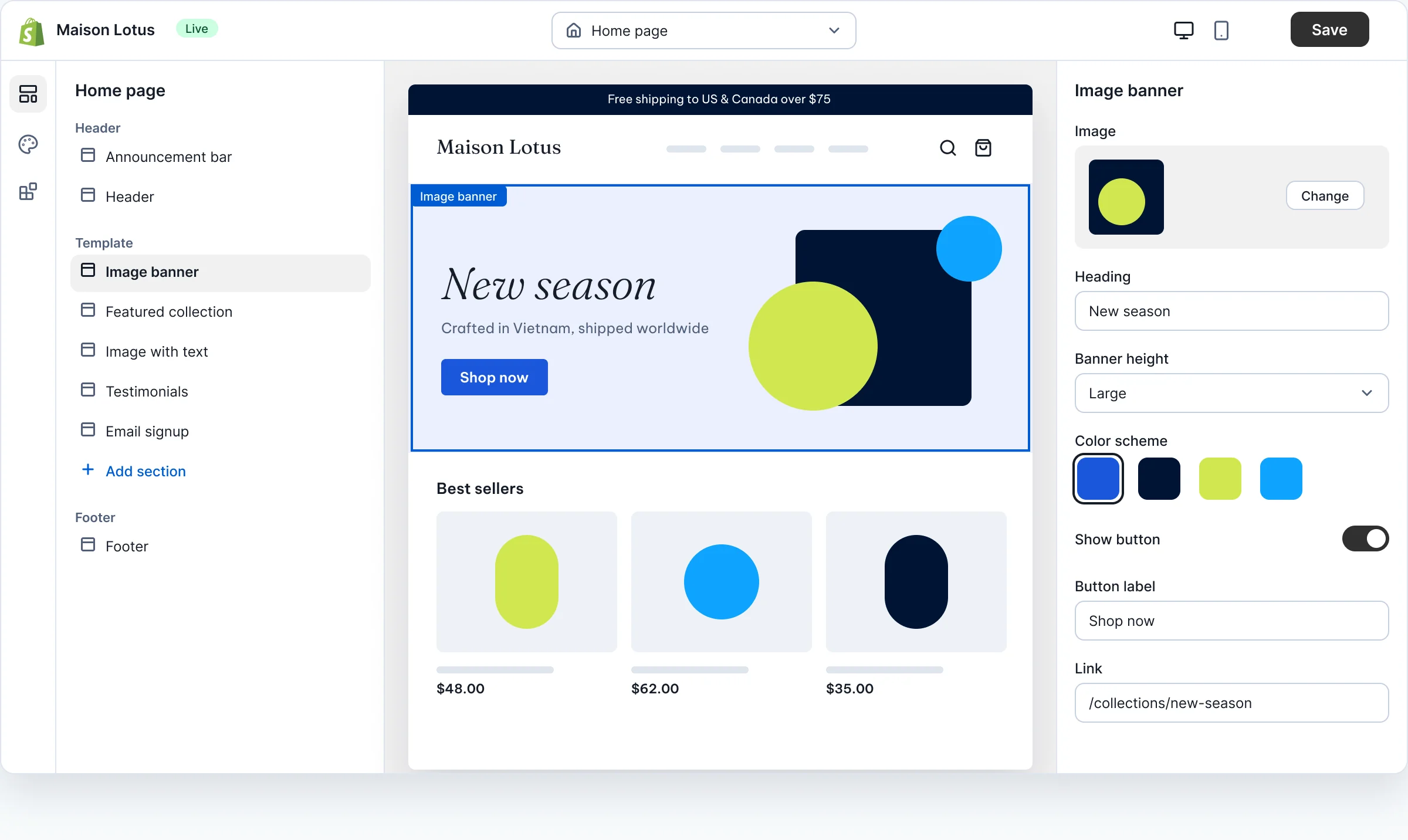
Every block on the page is a custom section: change images, text and colors, add or remove blocks and reorder them right in Shopify's editor.
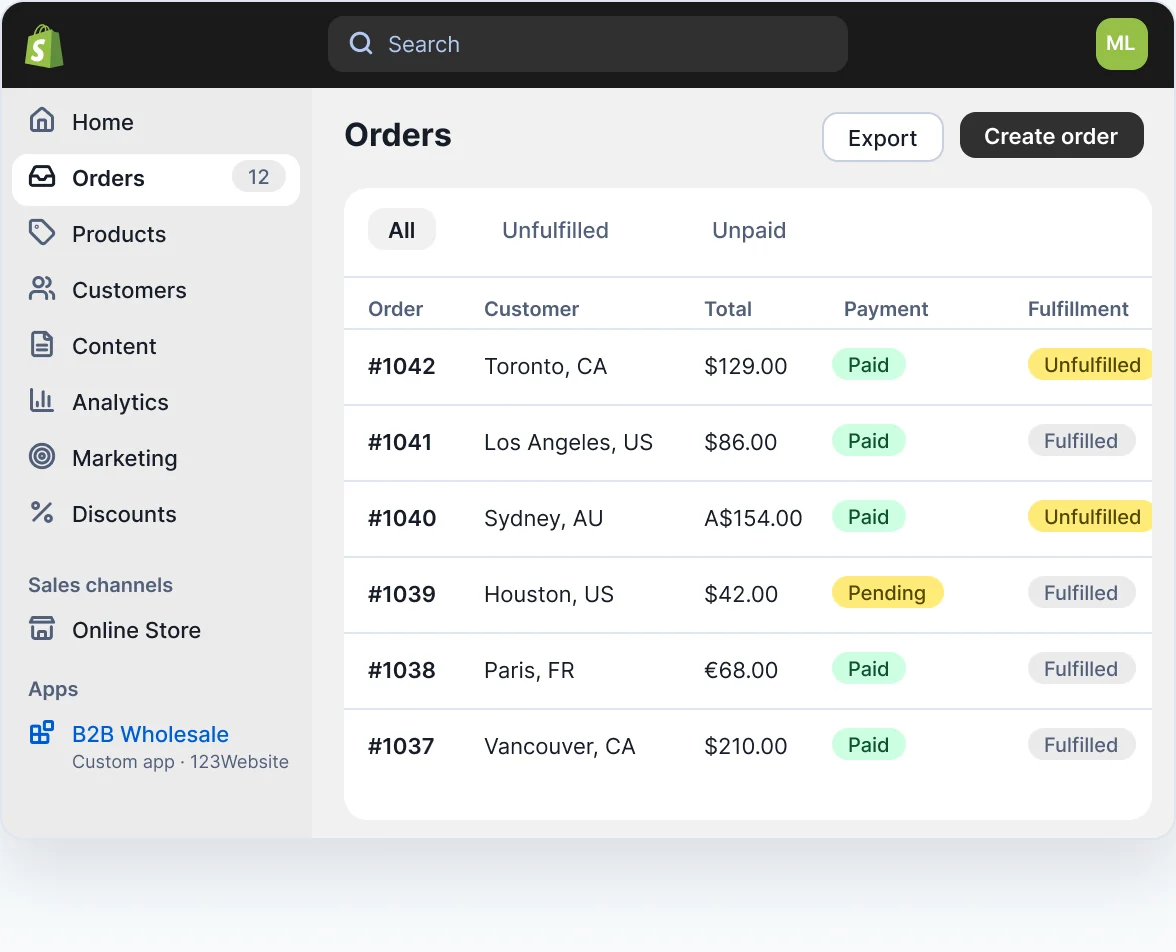
Your own business app (for example B2B wholesale) lives right inside the Shopify admin, so your team has no new system to learn.
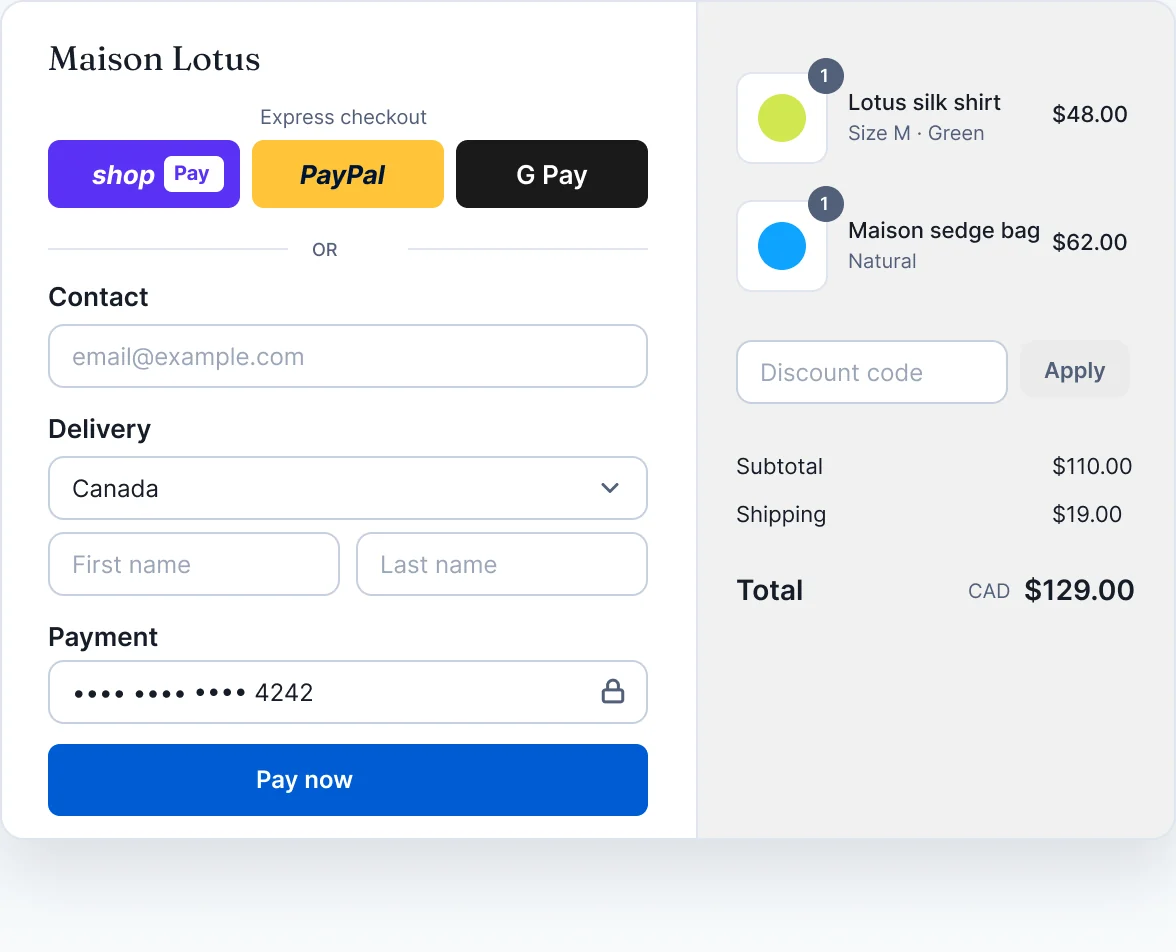
Shop Pay, PayPal, digital wallets and international cards built in, with further customization via Checkout extensions on Shopify Plus.
§ 04Every layer of your website
See for yourself
every layer of your website.
This is what you receive at each stage, not just a link at the end of the project.
-

01 · Sitemap
Category tree, filters and policy pages arranged around how shoppers search.
-
02 · Wireframe
Desktop and mobile wireframes, with the layout locked before any color goes on.
-
03 · UI/UX design
Figma designs in your brand identity, with a reusable design system.
-
04 · Shopify theme
Liquid to the Online Store 2.0 standard, drag-and-drop sections, configurable in the editor.
-
05 · Custom apps and modules
Connect Shopify to your business systems and build features around your workflow.
-
06 · Data migration
Move products, customers, past orders and posts, with 301 redirects to keep rankings.


§ 05SEO and speed
Easy to find,
fast to open.
Shopify has solid SEO basics, but heavy themes and too many apps slow pages down, and a careless migration loses rankings. This is where we go the extra mile.
SEO for Shopify
- Clean URLs and handles with the right keywords
- Complete 301 redirects when changing platforms
- Schema Product, Offer, Review, Breadcrumb
- Meta and Open Graph for every product
- Hreflang for each market and language
- Sitemap, Search Console, Merchant Center
PageSpeed
- WebP and AVIF images at the right size
- Lazy-load off-screen images and video
- Remove unused apps, bundle third-party scripts
- Critical CSS first, JavaScript deferred
- Self-hosted fonts, preloaded where needed
- Core Web Vitals measured before and after
Google's “Good” thresholds
Three Core Web Vitals
LCPMain content loaded≤ 2.5 seconds
INPResponse when shoppers tap≤ 200 ms
CLSLayout doesn't shift≤ 0,1
Measured with PageSpeed Insights on mobile before and after optimization. Real figures are in the handover report.
§ 06Technical capabilities
More than installing a theme,
custom code when it counts.
Most stores only need a good theme and a few apps. When your workflow is unusual, we write code in the right place instead of stacking more monthly paid apps.
Liquid
Custom theme
Liquid, Online Store 2.0, drag-and-drop sections and blocks, dynamic metafields.
Admin API
Custom app
Admin API, GraphQL and webhooks; sync orders, inventory and prices with your own systems.
Functions
Shopify Functions
Discounts, shipping rates and payment methods shown or hidden by your own rules.
Extensions
Checkout and customer accounts
Checkout UI extensions (Shopify Plus) and customized customer account pages.
Custom data
Metafields, metaobjects
Specs, size charts, lookbooks and FAQs that are easy to enter.
Markets
Shopify Markets
Multi-currency, multi-language, and a domain or subfolder for each country.
Shipping
Shipping and tax
Zone-based shipping, US sales tax, and GST for Australia and Canada set up correctly.
Integrations
Integrations
Email marketing, product reviews, CRM, ERP, accounting and logistics.
Hydrogen
Headless when needed
Hydrogen for projects that need a special experience and top speed.
§ 07Working remotely
In the US, Canada or Australia,
working together stays easy.
Talk to us in Vietnamese via Zalo, WhatsApp, email and online meetings. Every step comes with a Figma file or a test store you can review whenever suits you.
- Zalo, WhatsApp, phone0932 092 002 · +84 932 092 002
- Emailinfo@123website.com.vn
- Online meetingsGoogle Meet or Zoom by appointment
- Working hours (Vietnam time, GMT+7)Mon–Fri 8:00–17:30, Sat 8:00–12:00
Our working hours in your time zone
Based on daylight saving time. Add one hour when clocks change.Ho Chi Minh CityBusiness hours8:00–17:30
Sydney4 hours ahead of Vietnam12:00–21:30
TorontoEvening before to morning21:00–6:30
Los AngelesAfternoon and evening before18:00–3:30
§ 08Cost
Costs come in
three clear parts.
We quote by scope after our first call. You know up front what you pay 123Website and what you pay Shopify.
Paid to 123Website, once
Design and development
Based on scope: page count, theme customization, custom apps and the volume of data to migrate.
Quoted by scopePaid to Shopify, monthly
Shopify plan
You sign up and pay Shopify directly. We advise on the plan that fits your sales volume.
Per Shopify's pricingPaid to app vendors, if used
Third-party apps
We only install the apps you truly need. Special features can be custom built to cut monthly app fees.
Depends on the app
§ 09FAQ
FAQ
about Shopify websites
Can't find your question? Call 0932 092 002 or message us on Zalo, WhatsApp during business hours.
I'm overseas. How do I work with 123Website?
Through Zalo, WhatsApp, email and scheduled online meetings. You review designs in Figma and test the store on a development store whenever it suits you, no need to wait for Vietnam office hours.
Whose name is the Shopify store in?
We recommend the store, the Shopify plan and the payment gateway are in your business's name from day one. The 123Website team works through the collaborator access you grant; the handover scope is set out in each project's contract.
Can you migrate data from WooCommerce, Haravan or Wix?
Yes. Products, variants, customers, past orders and blog posts are migrated and reconciled by count; old URLs get 301 redirects to keep your Google rankings.
Ready-made theme or custom build?
Both. We can customize a theme from the Shopify Theme Store for a fast launch, or build a custom theme from your Figma design. We advise based on your budget and goals.
Can the site sell in many countries and currencies?
Yes. Shopify Markets shows prices in each market's currency and language, with a domain or subfolder per market; tax and shipping are set up per country.
Who supports us after launch?
The 123Website team supports you during working hours via hotline, Zalo, WhatsApp 0932 092 002 and email hotro@123website.vn. Support scope and duration are set out in the contract.
§ 10Get started
Tell us
about your
store.
Send a few details and we'll review your current store (if you have one) and reply with an approach and a quote for your scope.
- Hotline, Zalo, WhatsApp 0932 092 002
- Email info@123website.com.vn
- Working hours (Vietnam time, GMT+7) Mon–Fri 8:00–17:30, Sat 8:00–12:00
After you submit
- We get back to you during working hours
- A free online call
- You receive an approach and a quote
Store details* required
Main sales market
What you need (choose any)
Your information is used only for project consultation and is not shared with third parties.
Store details received
We'll get back to you during working hours (Vietnam time) by phone, Zalo or WhatsApp to set up an online call.
